For people who hike alone
Set a return time. If you don't check in, your contacts hear about it.
No satellite device. No one watching a map. Your iPhone and one return time.
iPhone · iOS 17 or later
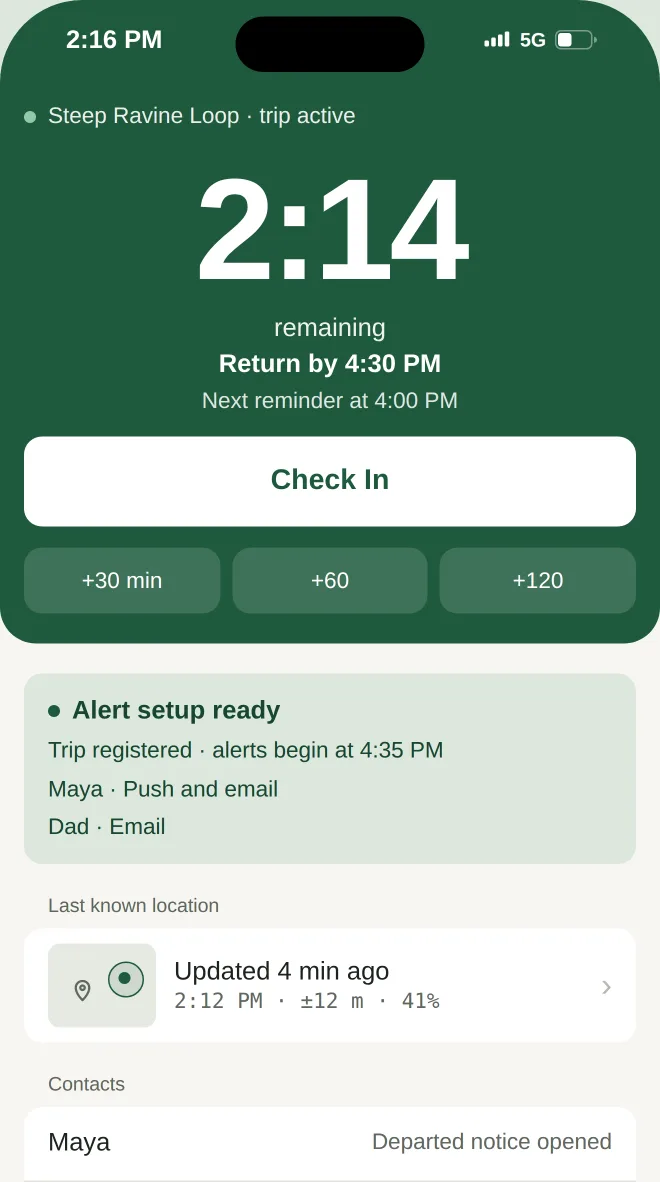
- Push and email
- Even with your phone off
- About 30 seconds to set up
- No account for your contacts
How it works
- 1
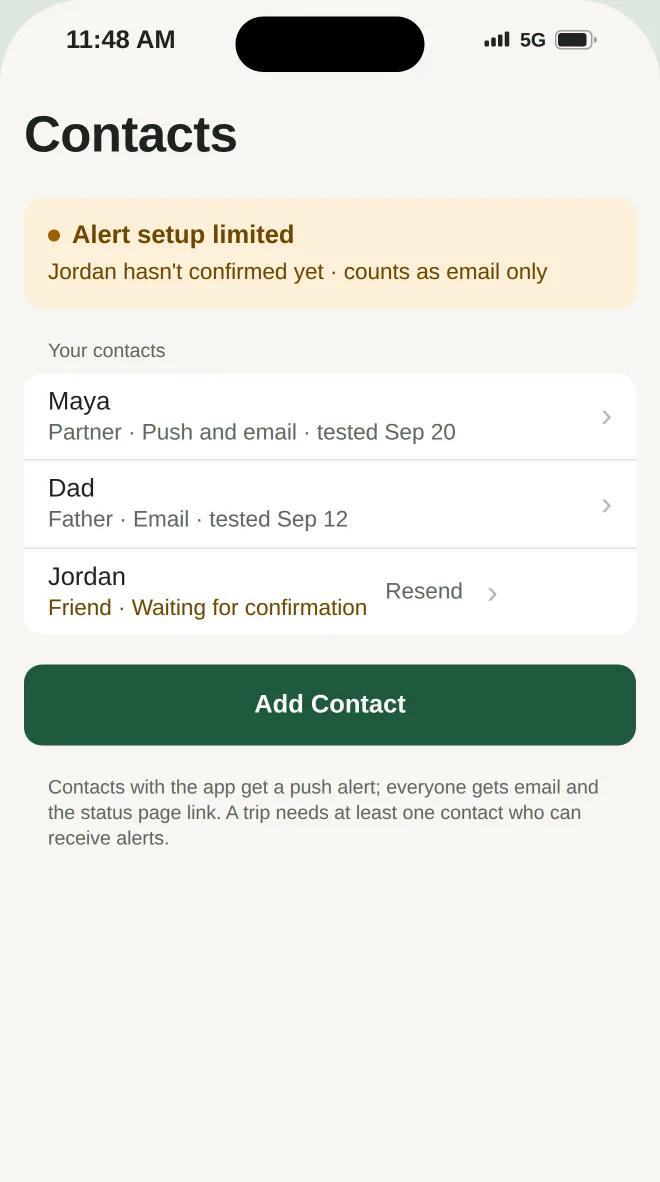
Add a contact
They accept with one tap. No account needed.
- 2
Start a trip with a return time
About 30 seconds. Your last trip is remembered.
- 3
Check in when you're back
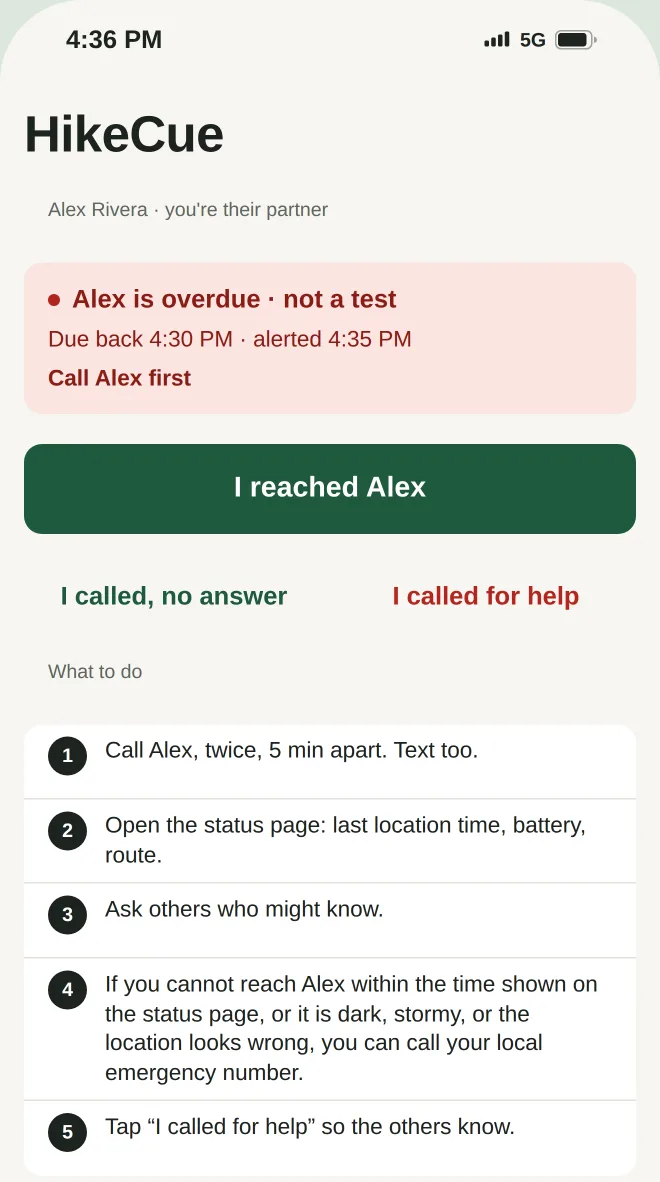
Miss the time, and HikeCue sends your contact an overdue notice by push and email, with your last known location and suggested steps.
What your contact sees
A status page with your trailhead, your return time, the last position your phone reported and when, an optional departure photo of your clothing and gear, your vehicle and your notes. They can mark that they reached you, or record that they called for help, and your other contacts are told.
Three kinds of notice
- Trip startedWhere Alex is going and when they are due back. Nothing to do.
- Overdue · not a testAlex missed the return time. You get their last location, route, trailhead, car and a step-by-step plan.
- Trip completedAlex checked in. The overdue notice is resolved.
Built for the trail
Sent by HikeCue, not your phone
Overdue notices go out at the time you set, even if your phone is off or out of coverage.
Reminders before your return time
30 and 15 minutes before, marked Time Sensitive so they get through Focus modes.
Extend from the lock screen
One tap. Live Activity and Dynamic Island show the countdown.
A grace period you choose
A few late minutes don't alert anyone.
Tomorrow's forecast for your trailhead
A weather briefing with sunset and a packing note, plus a Home Screen widget.
Be a contact for someone else
Accept their invite in the app and receive their notices here. Trip history keeps the route name and duration.
Privacy by design
Location only while a trip is running
With While Using the App permission. Never between trips, and HikeCue doesn't ask for Always.
No phone numbers, no address book, no health data
Your address book is never read. You invite each contact yourself, with a message you can edit.
Deleted 7 days after a trip ends
Location, photos and notes.
Sign in with Apple
Delete your account and all data in Settings at any time.
What HikeCue is not
HikeCue does not call anyone on your behalf. Whether to call for help is decided by your contacts. Delivery of notices can fail, and your last known position may be hours old when you are out of coverage. Read the terms before you rely on it.
Read the termsFrequently asked questions
Does it work without signal?
Yes. The return time is kept by HikeCue, so the overdue notice goes out even when your phone has no coverage or is off. Your last known location is the last position your phone reported while it had signal, and it may be hours old.
What if I'm just running late?
Extend from the lock screen with one tap, or check in early. The grace period you choose means a few late minutes don't alert anyone.
Do my contacts need the app?
No. They accept your invite with one tap and get notices by email and on a web status page. If they install HikeCue, they receive your notices in the app too.
Does HikeCue call for help?
No. HikeCue does not call anyone on your behalf. Whether to call for help is decided by your contacts. Notices can be false alarms, and delivery can fail.
What does it cost?
v1.0 is free, and there is nothing to buy in this version.
Which iPhones?
iPhone with iOS 17 or later. Your contacts can use any phone or computer with email and a browser.
Ready for your next solo hike?
Set a return time before you set off.
iPhone · iOS 17 or later